
dream Player IPTV
Christian Fees
Mar 20, 2020
Sep 18, 2025
64.4 MB
Varies with device
Varies with device
100,000+

Description
The perfect streaming app to stream Live IPTV channels or movie streams and radio to your mobile phone or tablet.
Features:
– Playlist support (M3U)
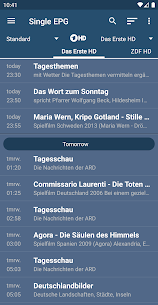
– EPG support (XML-TV)
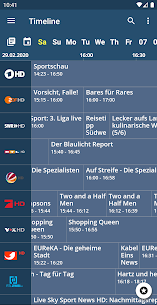
– Timeline and magazine view
– Watch SD and HD channels
– Listen to radio channels
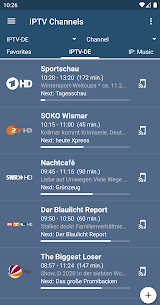
– Show picons/channel logos
– Favorite list management
– Theming support
– Zap channels in Live TV mode (swipe left or right to the next/previous channel)
– Quick forward and rewind in movie mode (use seekbar or buttons)
– Display subtitles
– Change aspect ratio
– Swipe up and down to control volume/brightness
– Play audio in background
– Window mode: Shows video in a small resizable window
– Chromecast support
– State of the art decoder integration (VLC and ExoPlayer)
– Perfect in companion with the app dream Player IPTV for Android TV/Fire TV (Coming soon)
Prerequisites:
– Existing M3U playlist from your IPTV service provider or free M3U list
Important:
No channels or links are included. You need to add at least one existing playlist.
Features:
– Playlist support (M3U)
– EPG support (XML-TV)
– Timeline and magazine view
– Watch SD and HD channels
– Listen to radio channels
– Show picons/channel logos
– Favorite list management
– Theming support
– Zap channels in Live TV mode (swipe left or right to the next/previous channel)
– Quick forward and rewind in movie mode (use seekbar or buttons)
– Display subtitles
– Change aspect ratio
– Swipe up and down to control volume/brightness
– Play audio in background
– Window mode: Shows video in a small resizable window
– Chromecast support
– State of the art decoder integration (VLC and ExoPlayer)
– Perfect in companion with the app dream Player IPTV for Android TV/Fire TV (Coming soon)
Foreground service usage:
The app uses a foreground service for Picture-in-Picture feature.
Images


Download links
How to install dream Player IPTV?
1. Download the ZIP file.
2. Install the Split APKs Installer application
3. Open the application and click on "Install APKs".
4. Find the folder where the downloaded ZIP is located and select it.
5. Follow the steps that appear on the screen.


